
Account access is protected by SSL encryption after login, a strong-password rule at registration and SMS activation of every new account. One account is allowed per person, and the account must only be used by its owner. Third-party access is forbidden under the Terms.
| Login essentials | Details |
|---|---|
| Where to log in | Yellow Login button, top-right corner of every page |
| Login method | Email address + password |
| Show password | Eye icon inside the password field |
| Password reset | Forgot Password link below the form |
| Device support | Desktop and mobile browsers, no app needed |
| Session security | 128-bit SSL encryption after login |
| Account activation | SMS code to the +61 number given at sign-up |
| When verification appears | At the first withdrawal request, or during random checks |
| Currency | AUD |
| Support | Live chat and [email protected] |
How to log in to Bonzaspins
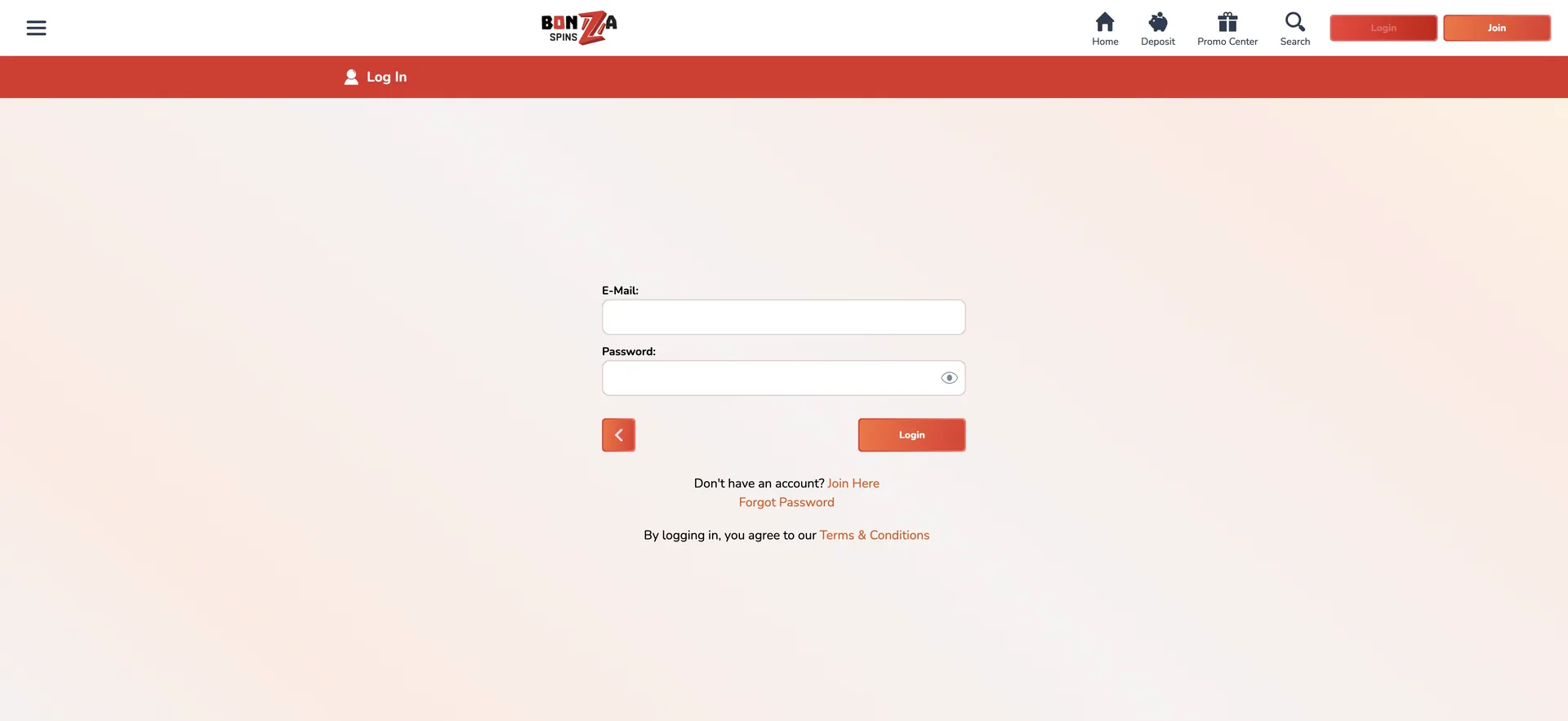
The login form is a simple two-field page with a red Log In header. The Login button stays in the same place in the top bar on desktop and mobile, so there is nothing to search for.
Step-by-step Bonzaspins login
Signing in takes well under a minute, provided the account has already been activated by SMS.
- Open the Bonzaspins site in your browser.
- Click the yellow Login button in the top-right corner, next to the red Join button.
- Enter the email address used during registration in the E-Mail field.
- Type your password. Tap the eye icon to check it for typos before submitting.
- Press the orange Login button under the form.
- Once logged in, the top bar shows your balance and the Deposit shortcut opens the cashier.
The small arrow button to the left of the form returns to the previous page. Signing in confirms agreement with the current Terms & Conditions, which are linked under the form.
No account yet? Creating a Bonzaspins profile
The login form has a Join Here link for players who have not registered. Registration and login are separate: an account must be created, and activated by SMS, before the login form will accept the details.
Quick registration flow
Sign-up runs through a bonus choice and four numbered steps, and the whole process takes a few minutes.
- Choose a welcome offer: Premium Bonus, Progressive Cashback or no bonus.
- Account Details: email, +61 mobile number, password, password confirmation and AUD as the currency.
- Personal Information: name, date of birth and address as shown on your ID.
- Activation: enter the SMS code.
- Finish: return to the Login button and sign in.
Secure login practices
The account holds real money and personal documents, so the Terms place responsibility for login security on the player. If someone else uses the account, the losses are the player's. A few habits keep the account safe.
- Use a unique password that is not shared with email or banking accounts.
- Never let anyone else log in to the account, even a family member. This breaks the Terms.
- Do not sign in through a VPN or proxy. Masking an IP address is treated as a serious breach.
- Log out on shared or public devices, and avoid saving the password in a shared browser.
- Report any unexpected activity to live chat immediately.
- Keep the email address and mobile number on the account up to date, because both are used for recovery and security checks.
Bonzaspins password recovery
A forgotten password is reset from the login page itself, with no need to contact support. The reset is sent to the email address registered on the account.
Reset steps
The process takes a couple of minutes if the registered inbox is accessible.
- Click Login in the top-right corner.
- Click the orange Forgot Password link below the form.
- Enter the email address used at registration and submit.
- Open the reset email and follow the link. Check the spam folder if it does not arrive within a few minutes.
- Set a new strong password and log in with it.
If the registered email address is no longer accessible, contact live chat. Support may ask identity questions or documents before changing account details.
Bonzaspins mobile login
Bonzaspins has no native app, so mobile login happens in the phone's browser. The layout is the same as on desktop: the Login button sits in the top-right corner next to Join, and the form opens full-width.
Tips for mobile login
A few settings make signing in on a phone faster and more reliable.
- Add the site to the home screen from Safari's Share menu or Chrome's menu for one-tap access.
- Allow the browser's password manager to fill in the email and password on a personal phone.
- Turn off data-saver or content-blocking modes if the form does not load.
- Keep the phone number on the account active, because SMS activation and security checks rely on it.
Troubleshooting common Bonzaspins login errors
Most login problems come from typos, stored browser data, an unfinished activation or a restricted account. The fixes below go from the most common cause to the rarest.
Incorrect email or password
The password field is case-sensitive, and autofill sometimes enters an old password. Use the eye icon to check the password, make sure Caps Lock is off, and type the email address manually. If the error repeats, reset the password through Forgot Password.
Browser or cache issues
If the page loads but the form does not respond, or the site shows only the loading koala, stored browser data or a blocking extension is the usual cause.
- Clear the cache and cookies, then reload the page.
- Disable ad-blockers and script blockers for the site.
- Try another current browser, such as Chrome, Safari, Firefox or Edge.
- Wait a few seconds after the page loads, because the site loads its content in stages.
Account not activated
Registration includes an SMS activation step. If it was skipped or the code expired, the account may not accept a login. Contact live chat with the registered email to request a new activation code.
Mirror address changed
Bonza Spins operates through numbered mirror domains. If a bookmarked address stops working, the account is not lost, because the same email and password work on the current mirror. Use an up-to-date link and check that the address belongs to Bonza Spins before entering any details.
Account blocked or restricted
Under the Terms, accounts can be locked during background checks, if duplicate accounts are suspected, if a VPN is used or if requested documents are not provided. In these cases the login page will not resolve the issue. Contact live chat or email [email protected] from the registered address and provide any requested documents.
What you can access after Bonzaspins login
Once signed in, the top bar and the side menu open the full account. The main sections available are:
- Account: personal details, contact information and settings.
- Wallet: cash balance, bonus balance, deposits and withdrawals.
- Deposit: the cashier, with AUD and crypto payment options.
- Promo Center: welcome package, Wheel of Luck, Deposit Stamps, Daily Rewards, cashback and The Perks.
- VIP Club and loyalty points: current level, avatar and points balance.
- Notification History: past messages about bonuses and account activity.
Account verification (KYC)
Logging in does not require documents, but the first withdrawal does. Fiat players are asked for government photo ID, proof of address no older than 2 months, and a photo of the card used, with the middle 8 digits and the CVV covered. Documents are reviewed within up to 5 business days. A withdrawal is cancelled if documents are not supplied within its 48-hour pending period, so uploading them early avoids delays. The casino may also run random background checks, during which the account can be locked until the requested information is provided.
FAQ
Short answers to the most frequent questions about signing in to Bonzaspins.
Where is the Bonzaspins login button?
The yellow Login button is in the top-right corner of every page, to the left of the red Join button. It is in the same place on mobile.
Does Bonzaspins login use an email or a username?
An email address. The form has two fields: E-Mail and Password.
How is a Bonzaspins password reset?
Click Login, then Forgot Password, and enter the registered email. A reset link is sent to that inbox.
Why does the Bonzaspins site only show a loading screen?
The site loads its content in stages and can take several seconds on slower connections. If it stays on the loading screen, clear the cache, disable blockers or switch browser.
Can the same account be used on phone and computer?
Yes. One account works on every device, and the balance, bonuses and loyalty progress are shared.
Is a VPN allowed for Bonzaspins login?
No. Using a VPN or masking the IP address is listed as a serious breach of the Terms and can lead to account closure.
What happens if an account is not used for months?
After 3 months without activity, a AUD 10 monthly maintenance fee applies while the account holds a balance. After 6 months the account is marked dormant.